
Email Settings
If you’d like to use a program on your computer, such as Microsoft Outlook, below are the settings which need to be entered.
Account Type
- pop (if on a single device)
- imap (if on multiple devices ie. smartphone, computer, tablet)
- Incoming Server: mail.yourdomain.co.nz
- Outgoing Server: mail.yourdomain.co.nz
- Username: your email address
- Password: you will have been set this
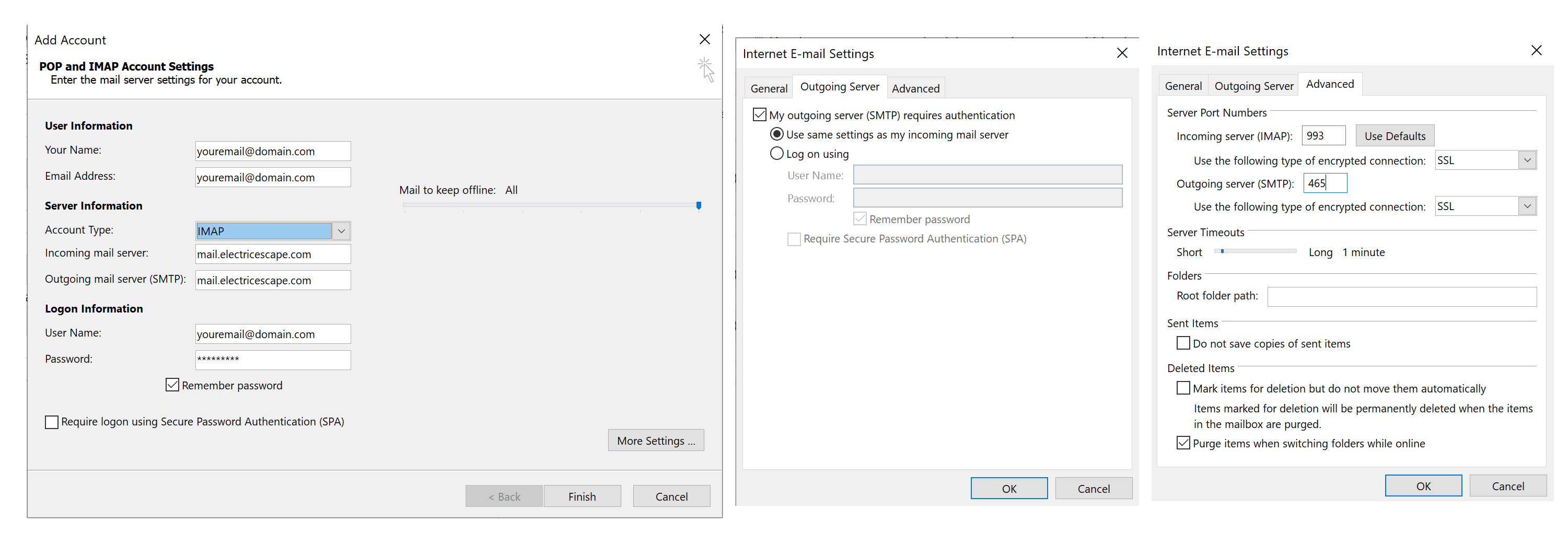
For outgoing mail authentication, you need to turn this on. In Outlook by selecting
“My outgoing server (SMTP) requires authentication”
and
“Use same settings as my incoming server”
You can also turn on SSL under security.
Port numbers should be automatically filled in for you depending on if you turn SSL/TLS on and if you selected pop or imap.
If SSL/TSL is turned on they should be:
- Incoming POP3 Port: 995
- Incoming IMAP Port: 993
- Outgoing SMTP Port: 465
If SSL/TSL is turned OFF they should be:
- Incoming POP3 Port: 110
- Incoming IMAP Port: 143
- Outgoing SMTP Port: 25 or 26
Any Issues?
Make sure SPA (secure password authentication) is OFF. You can also try using mail.electricescape.com for the incoming and outgoing email servers.
Here’s an example of settings if using IMAP and SSL is on.
Webmail
You can access your email online through the browser by going to https://webmail.electricescape.com/
Then go to Roundcube.
Spam settings
The server comes with spam management. If you would like spam settings turned up (meaning more emails will be marked as spam) please contact us.
Any email marked as spam will have ***SPAM*** in the subject line and will be automatically moved to your spam or junk folder. If you can’t see a junk folder, it may not be getting downloaded by your email client so you’ll need to use webmail to view it.
Any emails in the junk folder that are older than one month will automatically delete permanently. Any emails in the trash/deleted items folder will also delete after 40 days.
Note there will still be spam coming through, often which is from legitimate companies so doesn’t trigger the spam filter. In these cases you need to manually unsubscribe.
You can also run additional spam/malware software on your computer.